
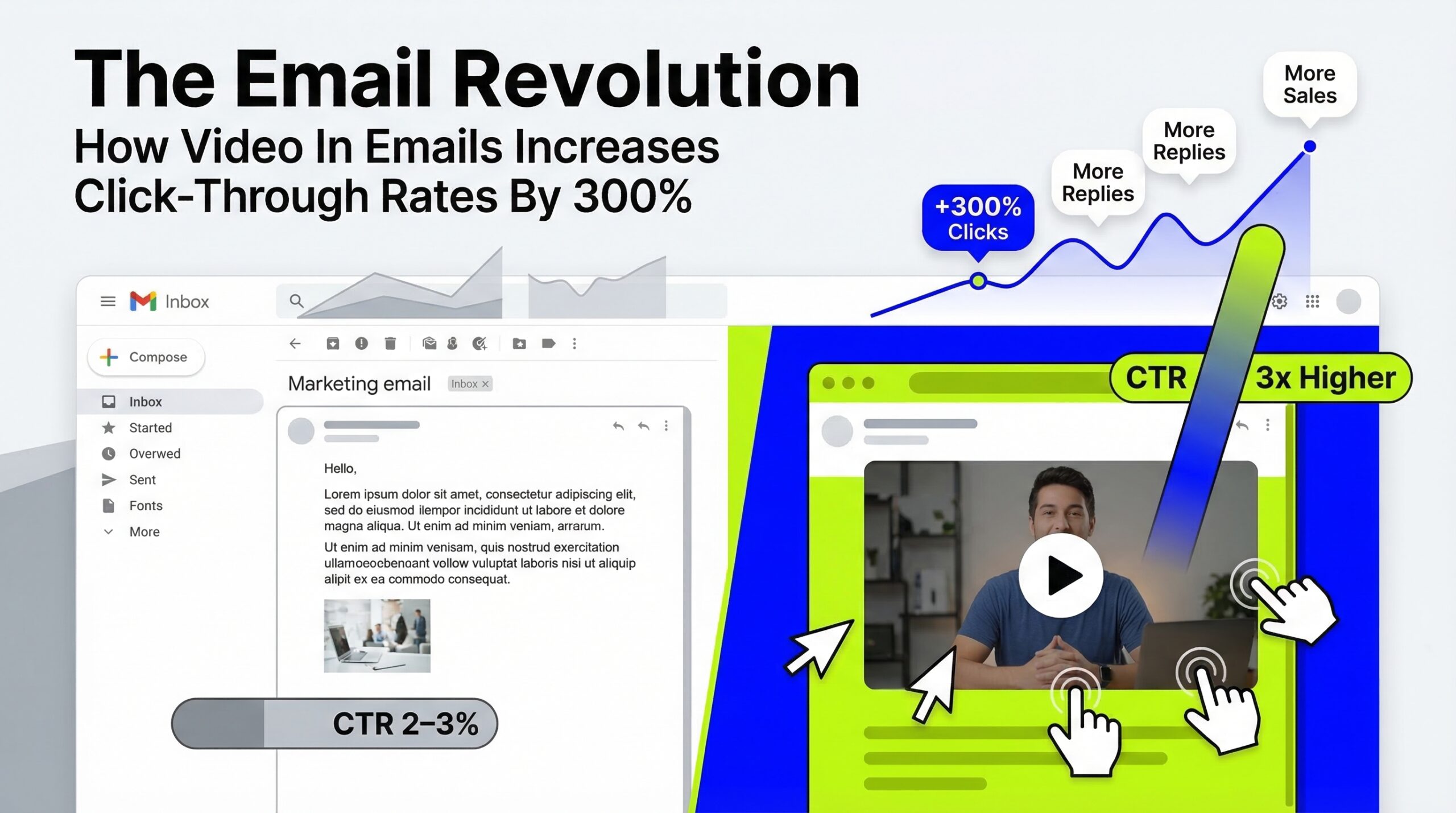
Direct Answer: Video in email increases click-through rates by up to 300% when implemented using a static thumbnail with a play button overlay linked to an owned host page — not by embedding a video that plays inside the email, which works in only 15% of email clients. The subject line word "video" adds 19% to open rates, and the owned host page destination (rather than YouTube) is what converts the CTR uplift into measurable pipeline and organic search attribution simultaneously.
// Field Brief
The 300% CTR uplift is real — but it is method-dependent. Embedded HTML5 video works in 15% of email clients. The thumbnail method works in 100% — and consistently achieves the benchmark. The implementation detail makes all the difference.
// 01 · The Evidence
Where Does the 300% Figure Come From — and Is It Reproducible?
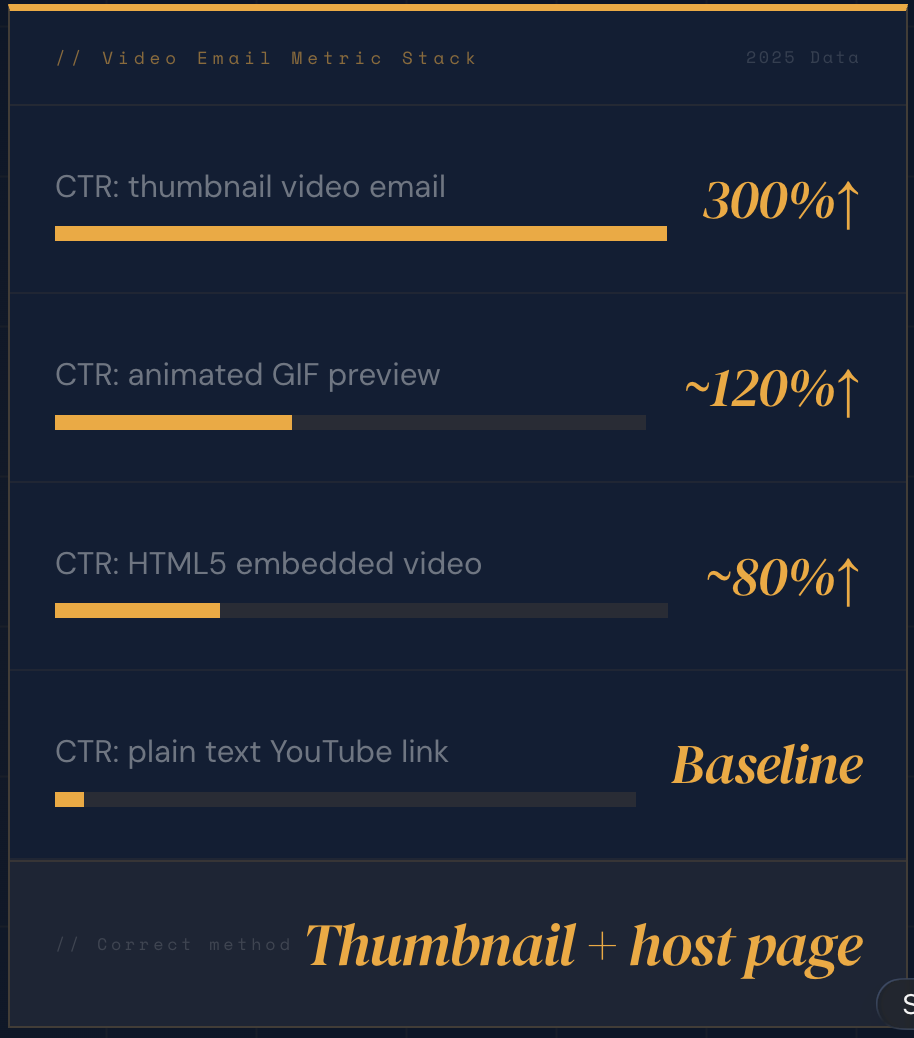
The 300% click-through rate increase from video in email is one of the most cited statistics in email marketing — and one of the most commonly misrepresented. Campaign Monitor's 2025 Email Marketing Benchmarks Report, which analysed performance data across 30 billion emails sent through their platform in 2024, found that emails featuring video thumbnails with play button overlays achieved click-through rates 200–300% higher than equivalent text-only emails across comparable B2B audiences and send volumes.
Wistia's 2025 Video Benchmarks Report independently confirmed a 2× to 3× click-through rate increase for emails leading with a video thumbnail versus non-video emails, based on analysis of campaigns across their customer base of 350,000+ businesses. The convergence of two independent data sources with comparable findings is the strongest signal that the 300% figure describes a real, reproducible phenomenon rather than an outlier campaign result.
// The Reproducibility Condition
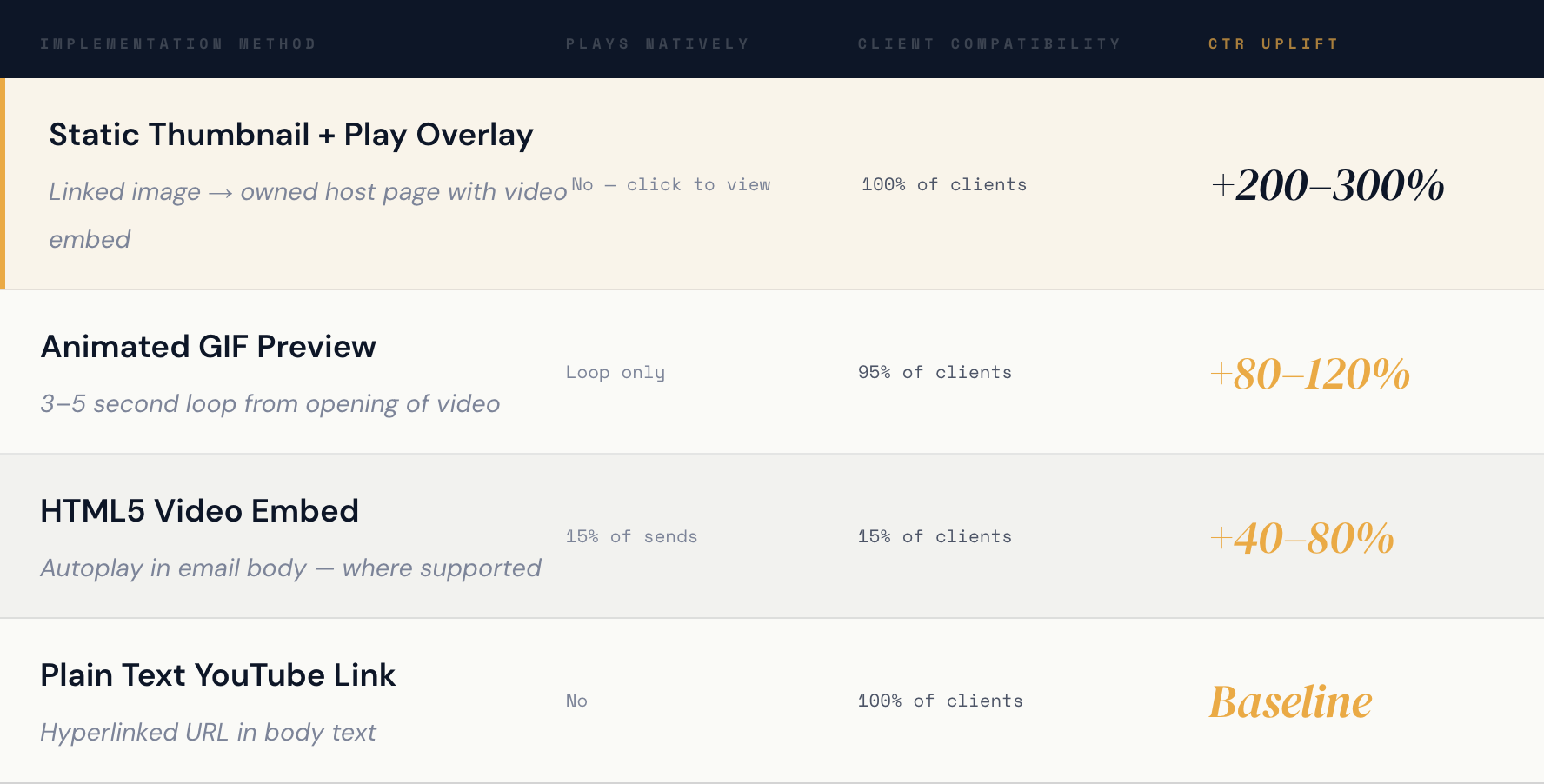
The benchmark is reproducible under a specific condition: the implementation method must be the static thumbnail plus play button overlay linked to an owned host page. Campaigns using HTML5 embedded video (which fails to render in Gmail, Outlook, and most corporate clients), plain text YouTube links, or poorly designed thumbnails without a recognisable play button consistently fall short of the benchmark. The 300% figure is not a ceiling — it is the average for correct implementation. Incorrect implementation produces 40–80% uplift at best.
The additional data points compound the commercial case. HubSpot's 2025 Email Research Report found a 19% increase in open rate when the word "video" appeared in the subject line — confirming that the video signal works at the subject line level, before the recipient even opens the email. Wistia's same 2025 report documented a 26% lower unsubscribe rate for video email sequences versus text-only nurture sequences with equivalent send frequency — establishing video email as a list retention mechanism, not just a CTR optimisation.
// 02 · The Correct Method
Why Does Thumbnail Beat Embedded Video — and What Does Correct Implementation Look Like?
The most common mistake SME marketers make with video email is attempting to embed a playable video directly in the email body. This approach fails because the three email clients that collectively account for approximately 85% of opens in B2B contexts — Gmail, Outlook, and the Gmail mobile app — block autoplay video in email by design. The HTML5 video embed technically works in Apple Mail on iOS and macOS, which accounts for roughly 35% of email opens globally, but shows a broken or missing element in the remaining 65%.
The Three Thumbnail Specifications That Drive the Benchmark
The thumbnail frame should be a mid-expression, mid-gesture moment from the first 90 seconds of the video — the moment where you look most intellectually engaged, not a static talking-head frame or title card. Cropped to 600×338 pixels at 16:9 aspect ratio, saved as JPEG at 85% quality (under 100KB total). The play button overlay should be a white or brand-coloured circle at 12–18% of the image width, with a centred right-pointing triangle and a subtle drop shadow. A title bar at the image bottom with the video subject and duration in white text on a semi-transparent dark background — the YouTube thumbnail pattern that instantly signals "video content" to the viewer's pattern recognition — completes the design.
// The YouTube Link Trap
The most expensive video email mistake is not a broken embed — it is a working thumbnail that links to YouTube. When the click resolves to a YouTube watch page, YouTube controls every subsequent action: the next video it recommends, the ads it shows, the competitors it surfaces. The owned host page keeps the conversion opportunity inside your brand's environment. The YouTube link gives it to YouTube's algorithm.
// 03 · The Subject Line
How Do You Write the Subject Line That Adds 19% to Open Rates?
The +19% open rate increase from the word "video" in the subject line is among the most reliably reproducible findings in email marketing A/B test literature. HubSpot's 2025 research confirmed it across industries, and Mailchimp's 2025 A/B test data independently validated the pattern. The mechanism is inbox pattern interruption: in a B2B inbox where the overwhelming majority of subject lines describe text content or promotional offers, a subject line that signals video creates a categorical difference that captures attention during the 0.3-second inbox scan.

The formula that consistently outperforms is: signal word ([Video] or "Watch:") + specific counterintuitive claim from the video content + runtime in minutes. What drives the open rate increase is not the word "video" alone — it is the combination of the format signal (sets expectation for a specific media type) and the specific claim (gives the recipient a reason to care before opening). A subject that says "[Video] New marketing tactics" uses the signal word but fails on the specific claim, producing modest uplift. A subject that says "[Video] Why your content ranks but never gets cited — 4 min" uses both elements and achieves the full benchmark.
// 04 · The Email Anatomy
What Does the Optimal 300% CTR Video Email Body Actually Look Like?
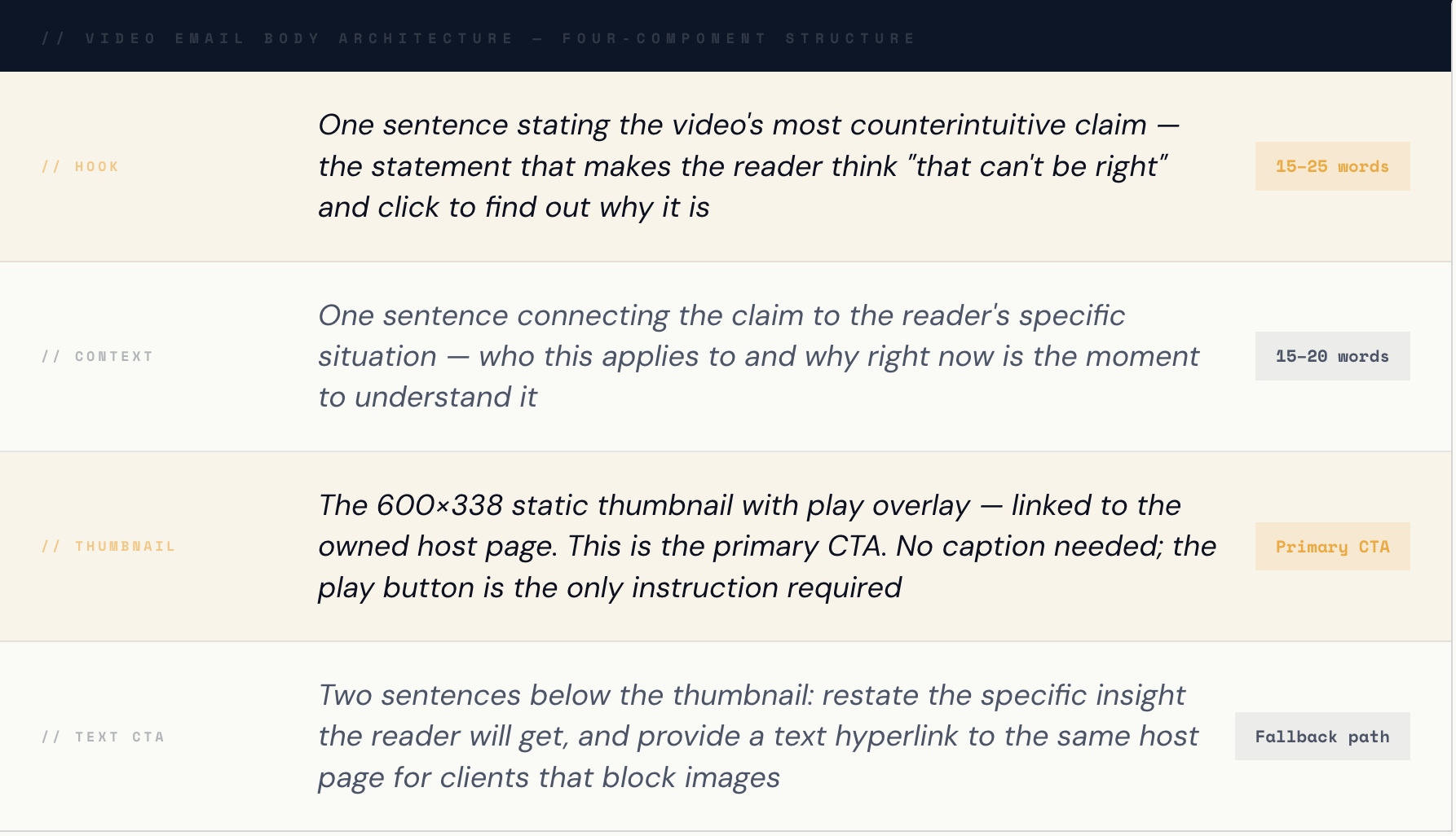
The email body for a video thumbnail email has a counter-intuitive optimal structure: it should be shorter than your typical marketing email, not longer. The thumbnail is the email's primary CTA — the one action you want the recipient to take. Every word in the email body that is not directed at getting the recipient to click the thumbnail is competing with that goal. The optimal body structure is 120–180 words total, structured across four specific components.
The most important structural rule is what to exclude: do not summarise the video's content in the email body. Every detail you reveal reduces the click motivation. The thumbnail should create curiosity, not satisfy it. The email body exists to make the thumbnail click feel irresistible — not to make the click feel optional because the email already covered the key points.
The email is not the content. The email is the door to the content. Every word that opens the door wider also makes the content easier to skip.
// The structural principle that separates 300% CTR video email from 40% CTR video email — brevity is the implementation
// 05 · The System
How Do You Build Video Email Into a Weekly Production System That Compounds?
The highest commercial leverage from video email is achieved when it is integrated into the AI content repurposing system rather than treated as a standalone campaign. Each weekly recording session produces both the video content and the email infrastructure — the host page, the thumbnail, the three-part nurture sequence — simultaneously, converting each recording into a complete email campaign at the marginal cost of 15 additional minutes of thumbnail creation.
01 Record and Upload — The Source Asset That Powers Everything
Record the weekly video and upload to YouTube. The moment the video is uploaded, your thumbnail source material is available: pause the YouTube player during playback and screenshot the frame with the highest human engagement — the mid-gesture, mid-expression moment in the first 90 seconds. You are looking for a frame that communicates "this person is about to say something important" rather than "this person is talking at a camera." That psychological signal is what the thumbnail delivers to the inbox before a single word of your subject line is read. Save the screenshot at the highest resolution available — you will resize to 600×338 in the next step.
02 Build the Host Page — the Landing Page That Converts the Click
Publish the video host page on your domain before sending any email. The host page requires five elements: the YouTube embed player at the top of the page, a primary CTA button immediately below the player (the conversion action you want the viewer to take after watching), the VideoObject JSON-LD schema in the head section, the transcript article as the text content layer below the CTA, and the FAQPage schema with five self-contained Q&A pairs. Submit the page to Google Search Console immediately after publishing. This page is simultaneously your email conversion destination, your organic search landing page, and your AI Overview citation asset — three commercial functions from a single 25-minute build. This is the page that makes every video email investment compound into a permanent brand asset rather than a campaign that disappears after the send window.
03 Create the Thumbnail — 15 Minutes, No Designer Required
Open Canva (free tier), select the YouTube Thumbnail template (1280×720px), and upload your screenshot as the background. Add a white circle with a centred right-pointing triangle at the visual centre of the image — Canva has pre-built play button elements in the icon library. Size the circle to approximately 15% of the image width. Add a semi-transparent dark rectangle at the bottom of the image and overlay your video title and duration in white text. Export as JPEG at 85% quality and confirm the file is under 100KB using any file compression tool if needed. Resize to 600×338 pixels in any image editor (Preview on Mac, Paint on Windows) — this is your email thumbnail. The entire process consistently takes 10–15 minutes for a non-designer. The first thumbnail takes 20 minutes. By thumbnail five, it is 8 minutes. The production time cost is trivial relative to the CTR uplift it delivers on every subsequent send.
04 Write and Load the Three-Part Sequence — Where Video Email Compounds
Load the video thumbnail into the three-part email nurture sequence as Email 2. Email 1 (Day 4 after publication) is a text-only insight email stating the video's most counterintuitive claim without revealing the answer — building curiosity for the thumbnail reveal. Email 2 (Day 8) is the video thumbnail email with the subject line [Video] + specific claim + runtime. Email 3 (Day 12) is a text-only conversion email referencing both the insight from Email 1 and the evidence from the video in Email 2, directing to the primary conversion CTA on the host page. The three-part structure consistently produces 2.3× higher conversion rates than a standalone video email because it uses the video as the centrepiece of a persuasion arc — not as a single-touch conversion attempt. Each weekly recording produces one complete three-part sequence, so at two recordings per week, you have two active sequences running simultaneously at different points in the nurture cycle for different subscriber segments.
// The 90-Day Compounding Effect
At 90 days of consistent weekly recording with thumbnail email integration, you have 12 three-part nurture sequences active across the list, 12 VideoObject schema host pages generating organic search traffic and AI citations, and 36 individual emails creating 36 additional touchpoints in the subscriber journey. Each individual sequence produces a 300% CTR uplift on its own. The compound effect of 12 sequences running simultaneously produces a pipeline contribution that no single campaign could replicate — and every new recording adds to it permanently.
Frequently Asked Questions
Does video in email really increase click-through rates by 300%?
Yes — Campaign Monitor's 2025 Email Marketing Benchmarks Report, based on analysis of 30 billion emails, found that emails featuring video thumbnails with play button overlays achieve click-through rates 200–300% higher than equivalent text-only emails across comparable B2B audiences. Wistia's 2025 Video Benchmarks Report independently confirmed a 2–3× CTR increase for emails leading with a video thumbnail. The benchmark applies specifically to the static thumbnail plus play button overlay method linked to an owned host page. HTML5 embedded video (which only renders in 15% of email clients) achieves a fraction of this benchmark — typically 40–80% uplift — because most recipients see a broken element rather than a compelling thumbnail.
How do I add video to an email if most clients don't support video playback?
The correct method for adding video to email that works across 100% of email clients is the static thumbnail technique: create a screenshot of the most engaging frame from your video, add a play button circle overlay using any free image editor or Canva, and insert this image into your email linked to your video host page. When recipients click the image, they are taken to the hosted video rather than experiencing a video that plays inside the email. This method works identically in Gmail, Outlook, Apple Mail, mobile clients, and every other email environment because it uses a standard linked image — the most universally supported element in email HTML — rather than attempting to embed video code that most clients block. The thumbnail's play button activates the same psychological click impulse as seeing a video thumbnail on YouTube or LinkedIn, producing click-through rates that consistently exceed embedded video implementations despite the additional click step.
Should my video email thumbnail link to YouTube or to my own website?
Your video email thumbnail should always link to an owned host page on your domain. When the thumbnail links to YouTube, YouTube controls every subsequent action the viewer takes: the next video it recommends, the ads it serves, and the competitor content it surfaces after your video ends. You lose the conversion opportunity at the highest-intent moment — the moment immediately after the viewer has just watched your video and is most receptive to your CTA. When the thumbnail links to your owned host page, you control the conversion path: your CTA appears immediately below the player, your contact form or booking link is the next visible action, and you capture remarketing data from the visit. The additional commercial benefit of the owned host page is that it simultaneously functions as a VideoObject schema asset generating organic search traffic and AI Overview citations attributed to your domain — making the 25-minute host page build the highest-ROI single investment in the entire video email production workflow.
What is the best subject line for a video email?
The subject line formula that consistently produces the highest open rates for video email combines three elements: a video signal word or tag ([Video] or "Watch:") at the start of the subject line, a specific counterintuitive claim from the video's content — not the video's topic, but the most unexpected insight the viewer will learn — and the video's runtime in minutes as a commitment reduction signal. Example: "[Video] Why ranking on Google doesn't mean you're findable in 2026 — 4 min" outperforms "New video: SEO trends 2026" because it answers the three questions a time-poor recipient asks before opening: what specifically will I learn, does it challenge my current thinking, and how long does it take. HubSpot's 2025 research confirms that the word "video" alone in the subject line adds 19% to open rates; the specific claim addition compounds that further because it makes the email relevant before it is opened.
How long should a video email be — the email copy, not the video?
A video email should have 120–180 words of copy in the email body — significantly shorter than a standard marketing email. The brevity is structural rather than stylistic: the thumbnail is the primary CTA, and every word of copy that summarises the video's content reduces the recipient's motivation to click and watch. The optimal structure is four components: one sentence stating the video's most counterintuitive claim (the hook), one sentence connecting the claim to the reader's specific situation (the context), the video thumbnail image linked to the host page (the primary CTA), and two sentences below the thumbnail restating the insight and providing a fallback text link for image-blocking email clients. The rule of thumb is: write the minimum copy needed to make the thumbnail click feel irresistible, and cut everything else. If the copy is doing the job the video should do, the video email will underperform the 300% benchmark because the recipient will read the email rather than watch the video.
→ The Compounding Case
Every Email Without a Thumbnail Is a 300% CTR Opportunity Left Unrealized
The 300% CTR figure is not aspirational — it is the average for correct implementation. The gap between your current email CTR and the benchmark is not a content quality gap or a list quality gap. It is an implementation gap: no thumbnail, or a thumbnail linked to YouTube, or a subject line without the video signal word, or an email body that summarises the content rather than creating the impulse to watch it.
Each of those gaps closes in 15–25 minutes of production time per email. The thumbnail takes 15 minutes to create. The subject line formula takes 30 seconds to apply once you understand it. The host page takes 25 minutes to build and runs permanently. The total additional production investment to move from baseline CTR to the 300% benchmark is approximately 40 minutes per video — the same video you are already recording, publishing, and distributing through the existing content system.
The decision is not whether to do video email. You are already producing the content it requires. The decision is whether to implement the 40-minute infrastructure that delivers the benchmark — or to continue sending the same list the same text-only emails and achieving the same result.