
Direct Answer: An XML sitemap generator automates the creation and maintenance of the protocol file that tells search engines and AI indexing systems which pages exist, when they were last updated, and how to prioritise crawling. AI-powered sitemap generation keeps your site indexed and fresh by automatically detecting new content, updating lastmod timestamps accurately, generating video and image sitemaps, and submitting changes to Google Search Console without manual intervention.

Your XML sitemap is the instruction manual you hand to every search crawler and AI indexing system that visits your domain. Most businesses hand over a broken manual — and wonder why their pages don't rank.
Why Does Your Sitemap Directly Control How Much of Your Site Google Actually Indexes?
Every search crawler operates under a crawl budget — a finite number of page-fetch requests it will allocate to your domain per day. For large sites, this budget is in the thousands. For SME websites, it may be in the hundreds. Every wasted fetch — a redirect, a duplicate URL, a non-canonical page — is a page of valuable content that does not get indexed that crawl cycle.
Your XML sitemap is the primary input that determines how Googlebot, BingBot, and increasingly the AI retrieval crawlers used by Perplexity and ChatGPT Search allocate that budget. A correctly structured sitemap routes crawl capacity to your canonical, indexable, highest-priority pages. An incorrectly structured one actively misdirects it.
Google's documentation explicitly states that sitemaps are especially important for large sites, sites with poor internal linking, and new sites — three conditions that apply to the vast majority of SME content programmes. And yet from our experience auditing SME websites, the sitemap is the most consistently neglected technical SEO asset: set once during initial site build, never maintained, and rarely verified against the actual live content state of the domain.
// The Hidden Indexing Gap
Google Search Console's Coverage Report regularly shows SME sites with 20 to 40 percent of submitted URLs in "Excluded" status — pages that exist in the sitemap but are not being indexed, often because the sitemap is including redirected, non-canonical, or noindex-tagged pages that waste crawl budget without contributing a single indexed page. An AI sitemap generator that auto-validates each URL before inclusion eliminates this category of waste entirely.
What Are the Sitemap Errors That Silently Cost You Indexing Coverage?
The most common sitemap errors are not configuration mistakes visible on first inspection. They are structural problems that accumulate silently as a site grows — new pages added, old pages redirected, canonical tags updated — while the sitemap file remains frozen at its last manual update.
Issue Type
Indexing Impact
Severity
URLs Returning 301 Redirects
Sitemap lists old URL, not redirect destination
Crawl budget wasted on redirect chain; destination may never be directly indexed from sitemap signal
High
Canonical Mismatches
Sitemap URL differs from page's self-canonical tag
Conflicting signals split ranking authority; Google may index neither URL reliably
High
No index Pages in Sitemap
Pages tagged no index but still submitted
Contradictory directives — Google must resolve the conflict, wasting crawl allocation
High
Stale or Missing last mod Dates
Dates not updated when content changes
Google deprioritizes recrawl of pages with old lastmod dates; fresh content goes unindexed for weeks
Medium
Missing Video Sitemap
Video content absent from sitemap index
YouTube-hosted or self-hosted video excluded from Google video carousel and AI Overview video citation
Medium
Single Sitemap Over 50,000 URLs
Exceeds Google's per-file URL limit
Pages beyond the limit are silently excluded from submission; no error surfaced in Search Console
Medium
Priority Values Set Incorrectly
All pages at priority 1.0 or identical values
Google ignores uniform priority signals; crawl budget not directed toward highest-value pages
Low
No Sitemap Index File
Individual sitemaps not referenced centrally
Crawlers must discover each sitemap separately; some sub-sitemaps may never be found
Low
// From Our Experience
What we consistently see in real-world SME audits: the most damaging sitemap error is not the technically obvious ones above — it is the gap between when content is published and when it appears in the sitemap. For sites using manual or plugin-generated sitemaps that regenerate nightly, new blog posts published at 9am may not appear in the sitemap until the following morning. That 24-hour indexing delay, across 200 posts per year, compounds into weeks of lost first-indexed position advantage per year. AI-generated sitemaps that update on publish eliminate this gap entirely.
What Does a Correct XML Sitemap Structure Look Like in 2026?
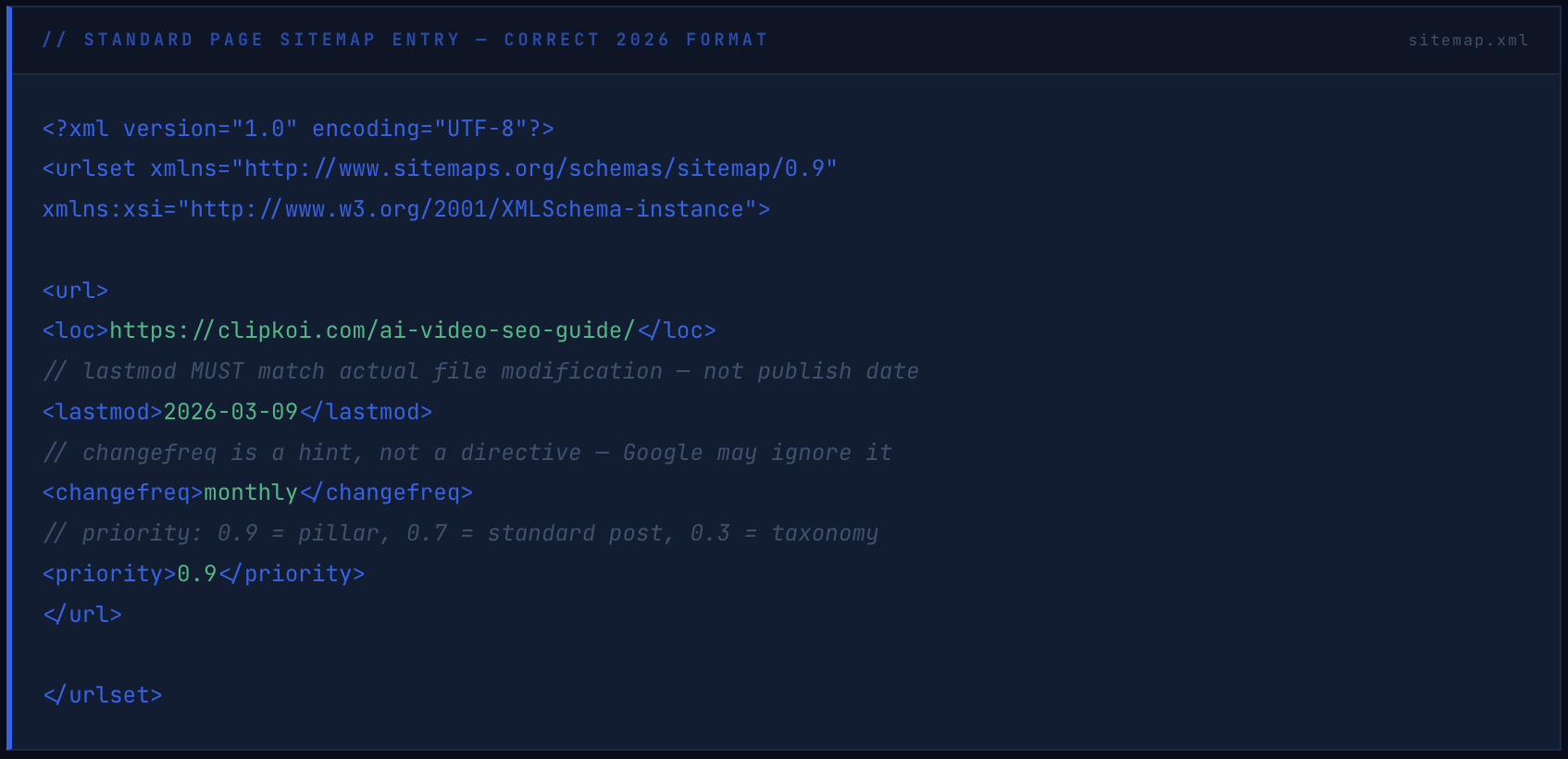
The XML sitemap specification has not fundamentally changed — but the way search engines and AI indexing systems use sitemap data has. The 2026 standard requires correct implementation of the core protocol plus two additional sitemap types that most SME sites still do not have: a video sitemap and an image sitemap.
The Base Sitemap Structure
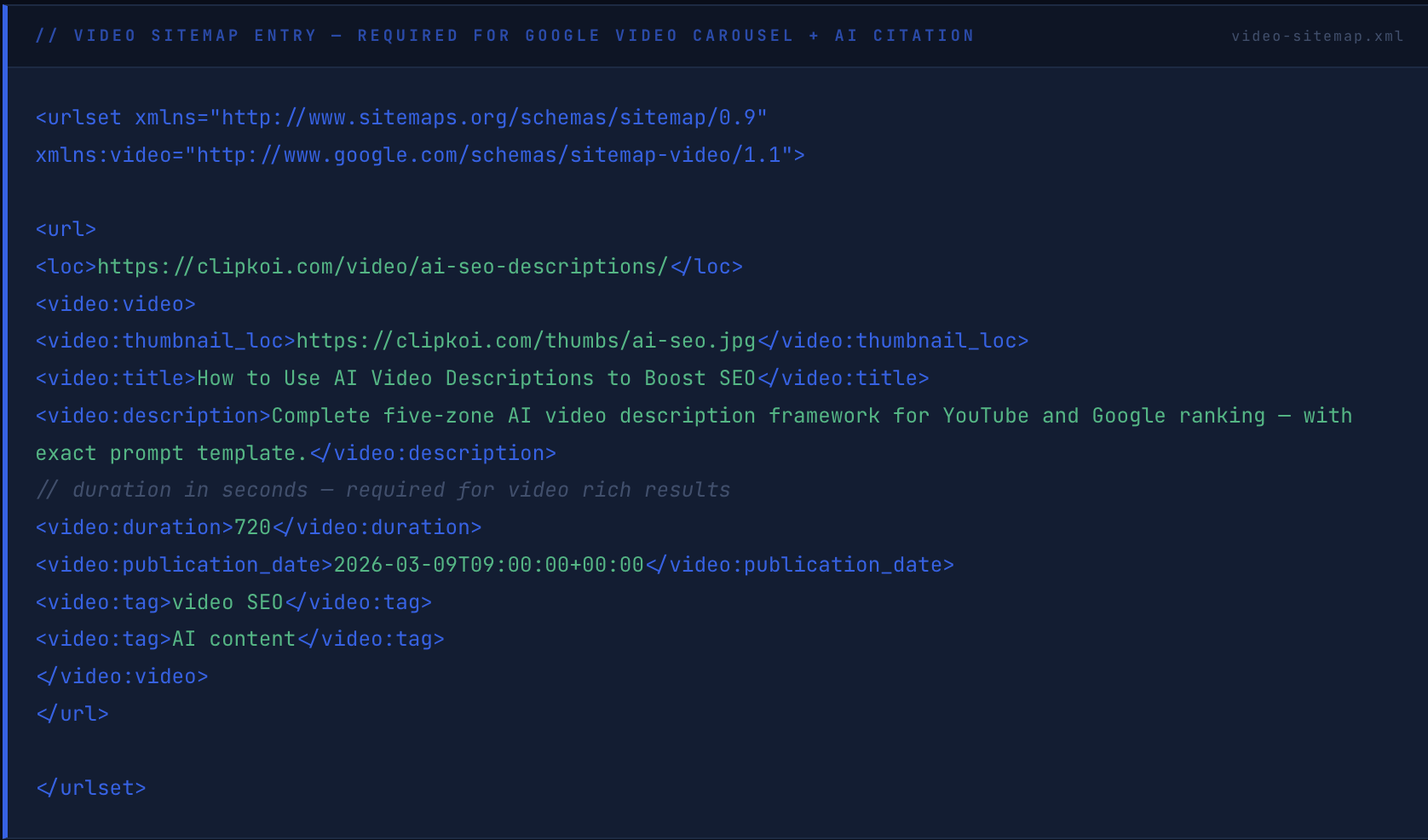
The Video Sitemap — Most Commonly Missing
The Sitemap Index File
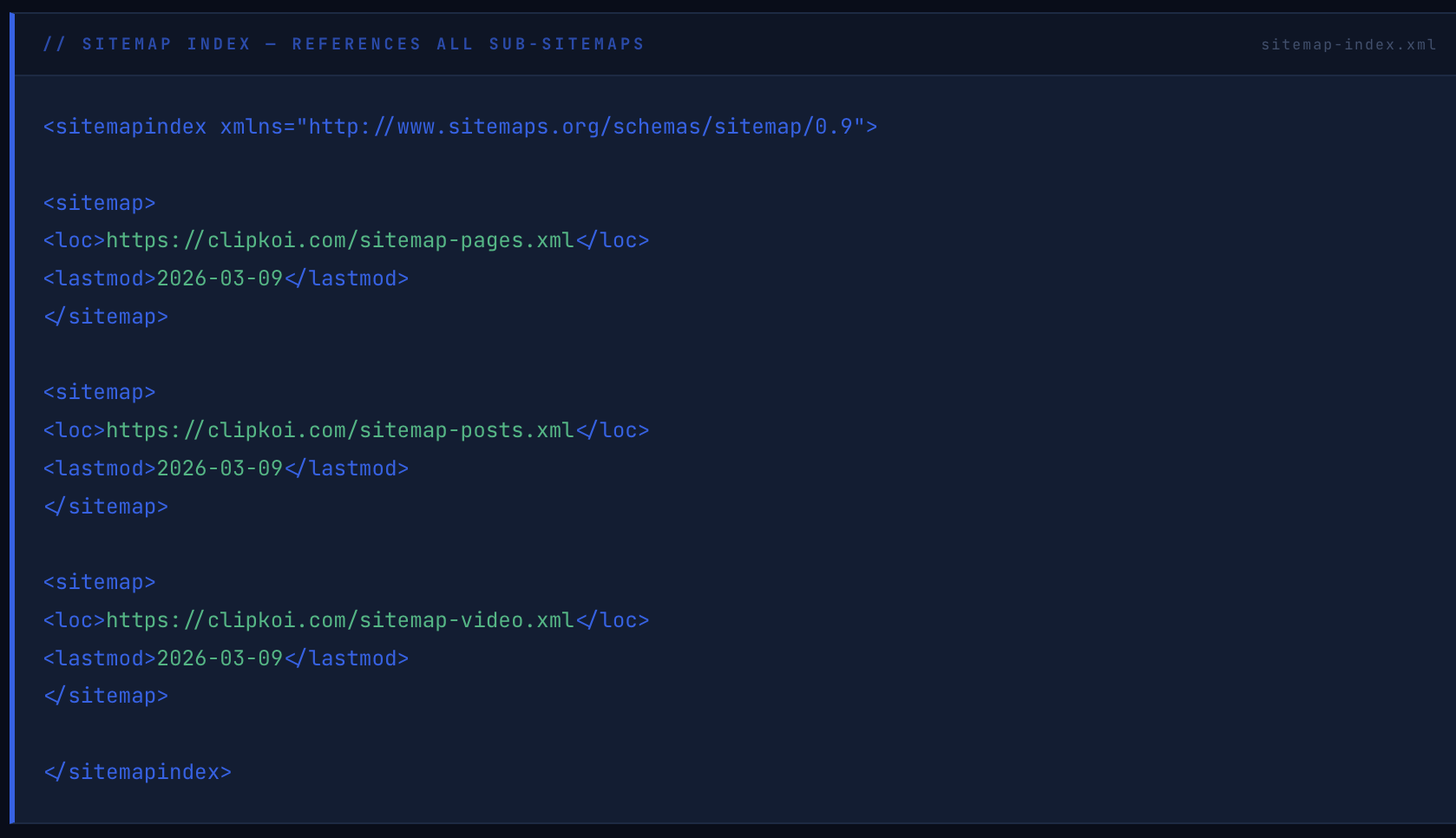
The sitemap index file is submitted once to Google Search Console. Every time any sub-sitemap updates, the change is visible to Google via the index file's lastmod timestamp — signalling that new content exists and triggering a prioritised recrawl without manual Search Console resubmission.
How Do AI-Powered Sitemap Generators Work — and What Makes Them Better Than Plugin-Based Tools?
Traditional sitemap plugins — Yoast SEO, Rank Math, All in One SEO — generate sitemaps on a scheduled basis from database queries of published posts and pages. They work for basic use cases. They break in four specific ways that AI-powered generators address directly.
Problem 1: Scheduled regeneration creates indexing gaps. A plugin regenerating nightly cannot update the sitemap the moment new content is published. AI generators trigger on publish events — the sitemap updates in real time, and the new URL is submitted to Search Console within seconds rather than hours.
Problem 2: Static generators cannot validate URL health. A plugin adds every URL matching a post type to the sitemap regardless of whether that URL returns a 200, 301, 404, or is tagged noindex. AI generators validate each URL before inclusion — checking status code, canonical consistency, and indexability signal — and exclude anything that would waste crawl budget.
Problem 3: Video content is systematically excluded. No standard WordPress sitemap plugin generates a compliant video sitemap from embedded or linked video content. AI generators extract video metadata — title, description, duration, thumbnail — from page content and generate the video sitemap automatically. For sites publishing video content, this is the difference between appearing and not appearing in Google's video carousel.
Problem 4: Last mod dates are inaccurate. Most plugins set lastmod to the content's original publish date, not its actual last-modified timestamp. Google uses lastmod to prioritise recrawls — a page updated last week with a lastmod date from two years ago will not be recrawled promptly. AI generators derive lastmod from the actual file system modification timestamp, ensuring Google's recrawl prioritisation is based on accurate freshness signals.
// The Difference That Compounds
For a site publishing four articles per week — 200 per year — the cumulative indexing delay difference between a nightly-regenerating plugin sitemap and a real-time AI sitemap is several thousand hours of delayed first-indexed time per year. In a competitive content category, being indexed first for a keyword cluster provides a first-mover ranking advantage that later-indexed competitors cannot close through content quality alone. Speed of indexing is a defensible competitive asset, not a technical footnote.
What Sitemap Configuration Does Your Site Type Need — and What Change freq Should You Actually Set?
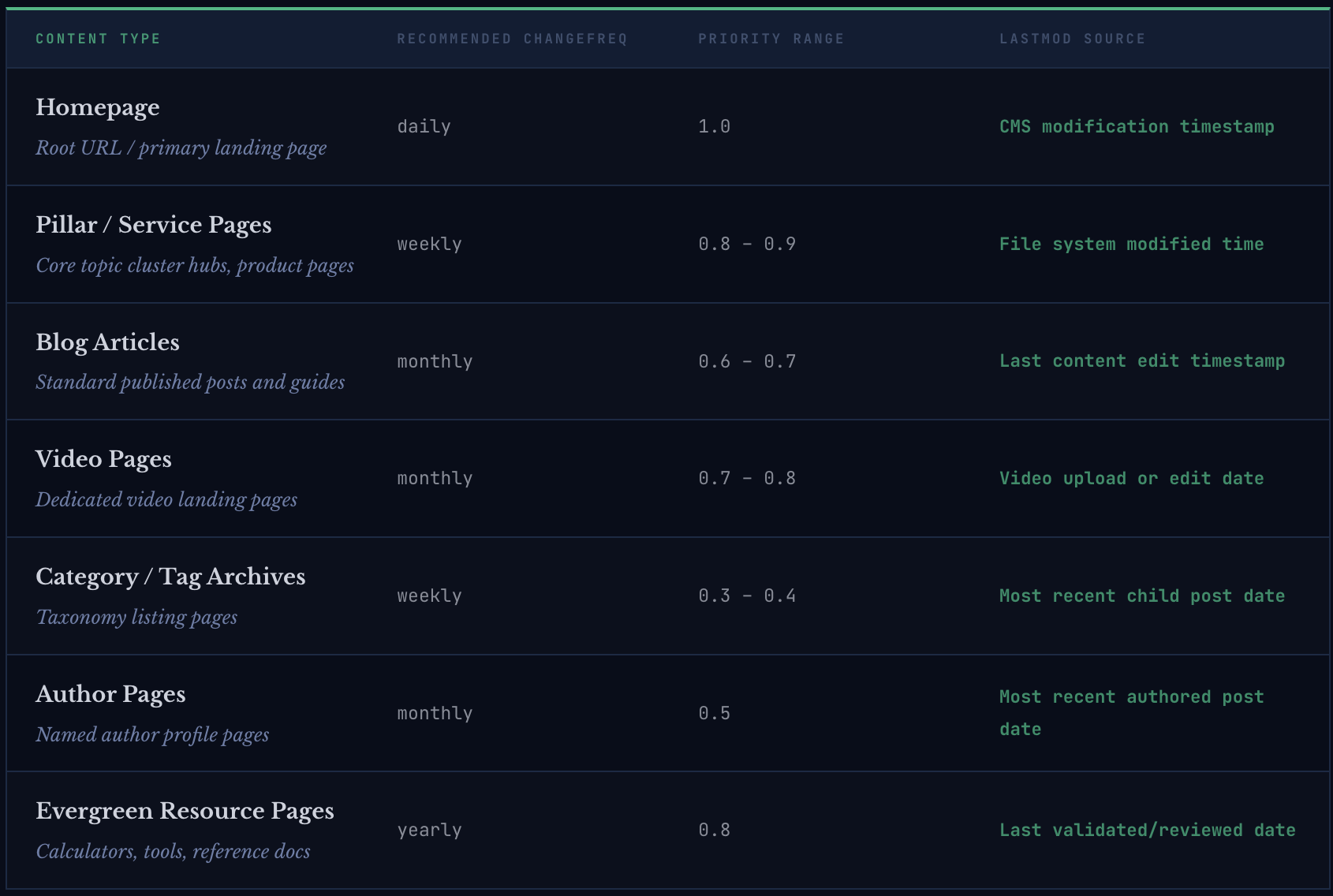
The changefreq and priority values in your sitemap are hints, not commands. Google's John Mueller has confirmed publicly that Google largely ignores changefreq because webmasters historically set it inaccurately. What Google does use — and weights meaningfully — is the lastmod timestamp. Every decision about changefreq should be understood as a communication of expected update pattern rather than an indexing directive.
What Is the Full Sitemap Maintenance and AI Optimisation Checklist Every SME Needs?
// Sitemap Health Checklist — 2026
12 Items · Technical + AIO
Submit Sitemap Index to Google Search Console
Submit the sitemap index URL — not individual sub-sitemaps — to Google Search Console under Sitemaps. Verify all sub-sitemaps are being discovered and processed with zero errors. Resubmit after any structural URL change to the site.
Technical
Validate All Sitemap URLs Return HTTP 200
Crawl your sitemap with Screaming Frog or Ahrefs Site Audit and verify every submitted URL returns a 200 status code. Remove any URL returning a redirect, 404, or 5xx status. A sitemap containing non-200 URLs actively misleads search crawlers about your site's indexable content state.
Technical
Audit Canonical Consistency Across All Submitted URLs
For every URL in your sitemap, verify the page's self-canonical tag matches the sitemap URL exactly — including trailing slash consistency, HTTP vs HTTPS, and www vs non-www. A canonical mismatch between sitemap URL and on-page canonical creates a conflicting signal that Google resolves by potentially indexing neither version reliably.
Technical
Verify No Noindex Pages Are Included
Export all pages tagged with noindex meta robots or X-Robots-Tag noindex header and cross-reference against sitemap contents. Any URL appearing in both the sitemap and noindex list creates a contradictory directive. Automated AI sitemap generators handle this exclusion automatically — manual and plugin-based sitemaps frequently do not.
Technical
Implement Real-Time lastmod Timestamps
Configure lastmod to derive from the actual file system modification timestamp of each page's content, not the original publication date. Verify by manually editing a test page, regenerating the sitemap, and confirming the lastmod value updates. Then submit the updated URL to Search Console's URL Inspection tool to trigger prompt recrawl of the changed content.
Both
Generate and Maintain a Video Sitemap
Create a dedicated video sitemap referencing every page on your domain that contains original video content — including YouTube-embedded videos. Include title, description, thumbnail URL, duration in seconds, and publication date for each video entry. Submit the video sitemap to Search Console separately. Video sitemap presence is a prerequisite for Google video carousel rich results and AI Overview video citation.
AIO
Set Dynamic Priority Values by Content Type
Assign priority values dynamically based on content type rather than leaving all pages at the default 0.5 or setting all to 1.0. Recommended hierarchy: homepage 1.0, pillar pages 0.8–0.9, standard posts 0.6–0.7, archives 0.3–0.4. This distributes crawl budget toward your highest-value content when Google does reference priority as a tiebreaker signal.
Technical
Add Sitemap Location to robots.txt
Add Sitemap: https://yourdomain.com/sitemap-index.xml to your robots.txt file. This ensures any crawler that reads robots.txt before beginning a crawl — including AI indexing bots — discovers your sitemap index immediately without waiting for a Search Console signal. Verify the robots.txt Sitemap directive is present after every site migration or platform change.
Both
Split Sitemaps Over 50,000 URLs Into Sub-Files
Google's sitemap protocol limits individual files to 50,000 URLs and 50MB uncompressed. Sites exceeding these limits must use a sitemap index file referencing multiple smaller sub-sitemaps. Verify your CMS or sitemap generator enforces this split automatically — silent truncation at the limit means pages beyond the boundary are never submitted without any error notification in Search Console.
Technical
Run Monthly Sitemap Audit Against Search Console Coverage Report
Compare your submitted sitemap URL count against Search Console's Coverage Report indexed count monthly. A persistent gap between submitted and indexed — where excluded URLs are not explained by noindex, canonical, or duplication directives — indicates a structural sitemap or crawl budget problem requiring investigation. The target: 90 percent or higher of submitted URLs indexed.
Both
Include Image Sitemap Data for Visual Content Pages
For pages with original images — product photography, infographics, original diagrams — include image sitemap extensions with title and caption metadata. Google Image Search and AI systems that index visual content use image sitemap data as a primary discovery signal for images that cannot be adequately described by surrounding page text alone.
AIO
Automate Sitemap Regeneration Triggers on Content Events
Configure your sitemap generator to trigger regeneration on content events — new post publish, post update, permalink structure change — rather than on a fixed schedule. Pair real-time regeneration with an automatic Search Console URL submission API call for new or substantially updated pages. This end-to-end automation reduces time-to-indexed from 24 hours to under 15 minutes for most SME content programmes.
AIO
Frequently Asked Questions
What does an XML sitemap generator do?
An XML sitemap generator automatically creates and maintains the XML sitemap file that tells search engines and AI indexing systems which pages exist on your domain, when they were last modified, and how to prioritise crawling them. In 2026, AI-powered sitemap generators go beyond static file generation to validate URL health before inclusion, update lastmod timestamps in real time when content changes, generate video and image sub-sitemaps automatically, and trigger Google Search Console submissions on publish events — reducing time-to-indexed from 24 hours to under 15 minutes per new page.
How does an XML sitemap affect Google rankings and AI indexing?
An XML sitemap does not directly influence rankings, but it significantly determines how much of your content gets indexed in the first place — which is a prerequisite for any ranking. A correctly structured sitemap directs Google's crawl budget toward your canonical, highest-value pages, ensures fresh content is recrawled promptly via accurate lastmod timestamps, and enables video and image rich results eligibility through dedicated sub-sitemaps. AI indexing systems used by Perplexity and ChatGPT Search also read sitemap data to discover and prioritise crawling of new content — making sitemap accuracy a direct factor in AI citation eligibility for recently published articles.
What is the difference between a sitemap and a sitemap index?
A sitemap is an XML file listing individual URLs on your domain — up to 50,000 URLs per file. A sitemap index is an XML file that references multiple individual sitemaps, allowing sites with large content libraries, multiple content types, or multilingual versions to organise their URL submissions into logical sub-sitemaps under a single discovery file. The sitemap index file is the one submitted to Google Search Console — Google then crawls each referenced sub-sitemap automatically. Most SME sites benefit from a sitemap index that separates pages, posts, video content, and taxonomy archives into distinct sub-sitemaps even well below the 50,000-URL limit, because it provides cleaner crawl budget allocation and clearer error visibility in Search Console's coverage reporting.
How often should you submit a sitemap to Google?
The sitemap index file should be submitted once to Google Search Console and does not need to be resubmitted unless the sitemap index URL itself changes. Google re-reads submitted sitemaps automatically when it detects lastmod timestamp changes in the index file. For individual new or updated pages, use Search Console's URL Inspection tool to request indexing directly — this triggers faster recrawl than waiting for Google to re-read the full sitemap. AI-powered sitemap generators can automate this URL-level submission via the Search Console Indexing API, achieving sub-15-minute time-to-indexed for new content without any manual intervention.
Do you need a video sitemap if you embed YouTube videos?
Yes. A video sitemap is required for Google to index your pages in the video carousel and for AI systems to recognise your pages as video content — regardless of whether the video is hosted on YouTube, Vimeo, Wistia, or self-hosted. The video sitemap tells Google that a specific page contains a video, provides the title, description, thumbnail, and duration, and enables Video Object rich results markup to be surfaced in search. Without a video sitemap, pages with embedded YouTube videos are typically indexed as standard articles, missing video carousel placement entirely. Google cannot infer video content from a YouTube embed code alone without the explicit signal provided by the video sitemap.
Index Everything You've Built — Starting With What Already Exists
Every article you've published, every video you've embedded, every pillar page you've carefully structured — none of it earns a ranking or an AI citation if it's not indexed. And it's not indexed if your sitemap is sending crawlers in the wrong direction.
The sitemap audit takes two hours. The schema corrections take one afternoon. The automated regeneration workflow, once configured, runs indefinitely with zero maintenance overhead. Six months from now, every page you publish will be indexed within minutes — not hours or days — and your video content will be eligible for every rich result and AI citation surface it was already qualified for.
The technical infrastructure already exists. The only thing between your content and full indexing coverage is whether your sitemap accurately represents the site you've actually built.