
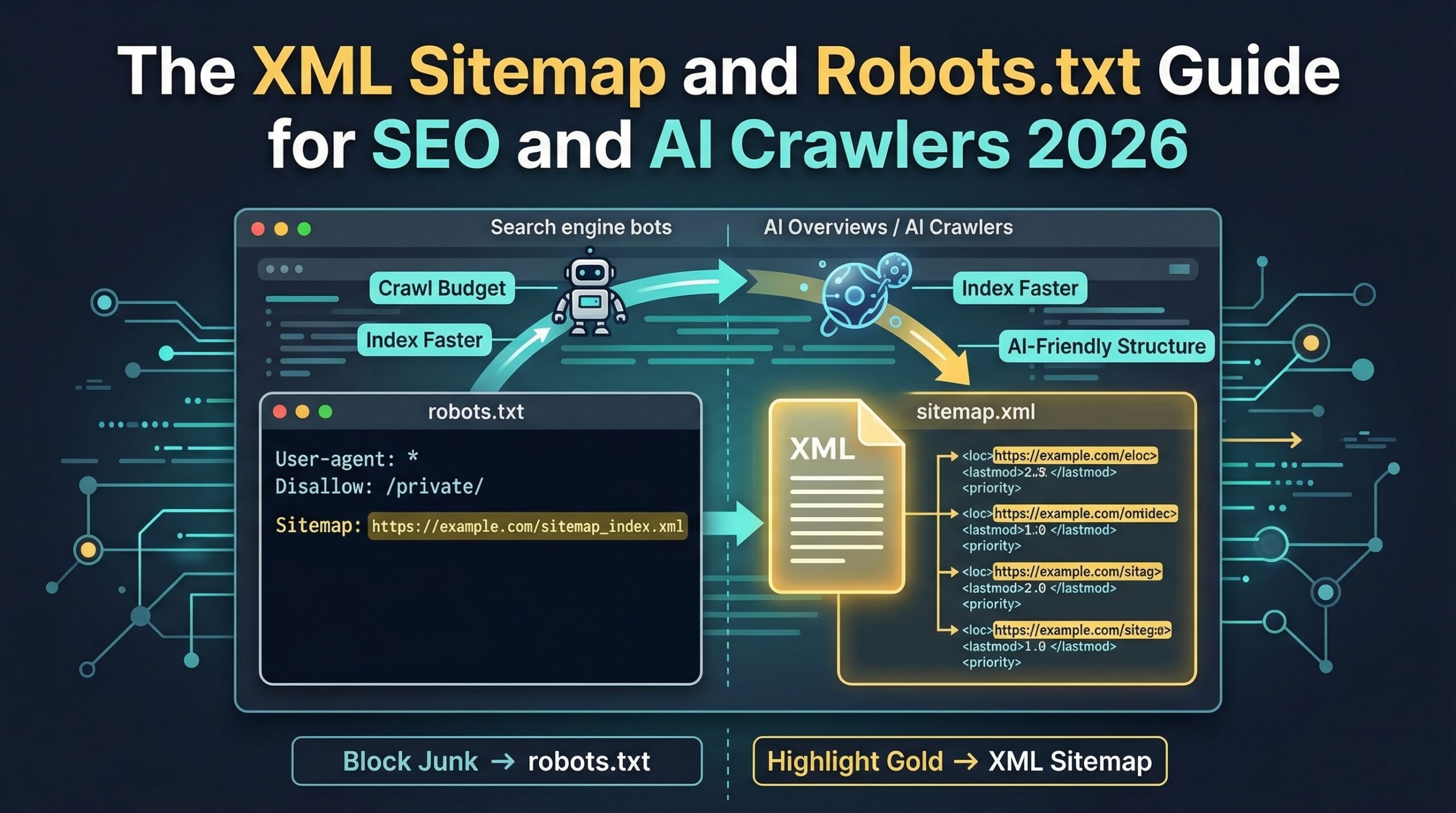
Direct Answer: An XML sitemap tells search engines and AI crawlers which pages exist and should be indexed. The robots.txt file tells crawlers which pages they are allowed to access. For SEO and AI visibility in 2026, the XML sitemap must include a dedicated video sitemap with VideoObject metadata, and the robots.txt must explicitly allow GPTBot, ClaudeBot, Google-Extended, and PerplexityBot — all four are blocked by default on many hosting platforms and CMS configurations.
// The Problem
Most SMEs invest heavily in content, schema, and entity verification — then leave their sitemap and robots.txt incorrectly configured, blocking AI crawlers at the technical layer before any of that investment can generate discovery. These two files are where all SEO and AI visibility begins.
// 01 · The Stakes
Why Do XML Sitemaps and Robots.txt Matter More in 2026 Than They Did Two Years Ago?
In 2023, misconfiguring your sitemap meant slower indexing and some missed organic search rankings. In 2026, misconfiguring your sitemap or robots.txt means AI crawlers cannot access your content at all — and content that AI crawlers cannot access cannot be cited in AI Overviews, Perplexity answers, or ChatGPT Search results, regardless of how well it is written, how thoroughly it is schema-marked, or how verified your entity infrastructure is.
The new AI crawlers — GPTBot (OpenAI), ClaudeBot (Anthropic), Google-Extended (Google AI training), and PerplexityBot — all honour the robots.txt protocol. If your robots.txt does not explicitly allow these user-agents, many hosting environments and CMS configurations will block them by default, silently excluding your content from the training and retrieval datasets that determine AI recommendation eligibility.
// Critical — Most Common Blocking Error
A Semrush 2025 crawl study of 10,000 SME websites found that 43% had at least one of the four major AI crawlers blocked in their robots.txt — either explicitly (a Disallow directive for the user-agent) or implicitly (a wildcard Disallow: / rule that blocks all non-whitelisted crawlers). These sites are investing in content and schema infrastructure that AI systems cannot read — producing zero AI citation return on that investment until the robots.txt is corrected.
The sitemap's role has also expanded. In 2024, Google introduced Video Sitemap priority weighting in its AI Overview selection algorithm — meaning video host pages with VideoObject schema in the sitemap receive preferential consideration for video-format AI Overview responses. An SME with ten VideoObject schema host pages that are not referenced in a video sitemap is receiving the same AI citation consideration as an SME with no video content — the infrastructure investment is present, but the discovery pathway that activates it is missing.
// 02 · The Sitemap
What Does a Correctly Configured XML Sitemap Look Like for SEO and AI Crawlers in 2026?
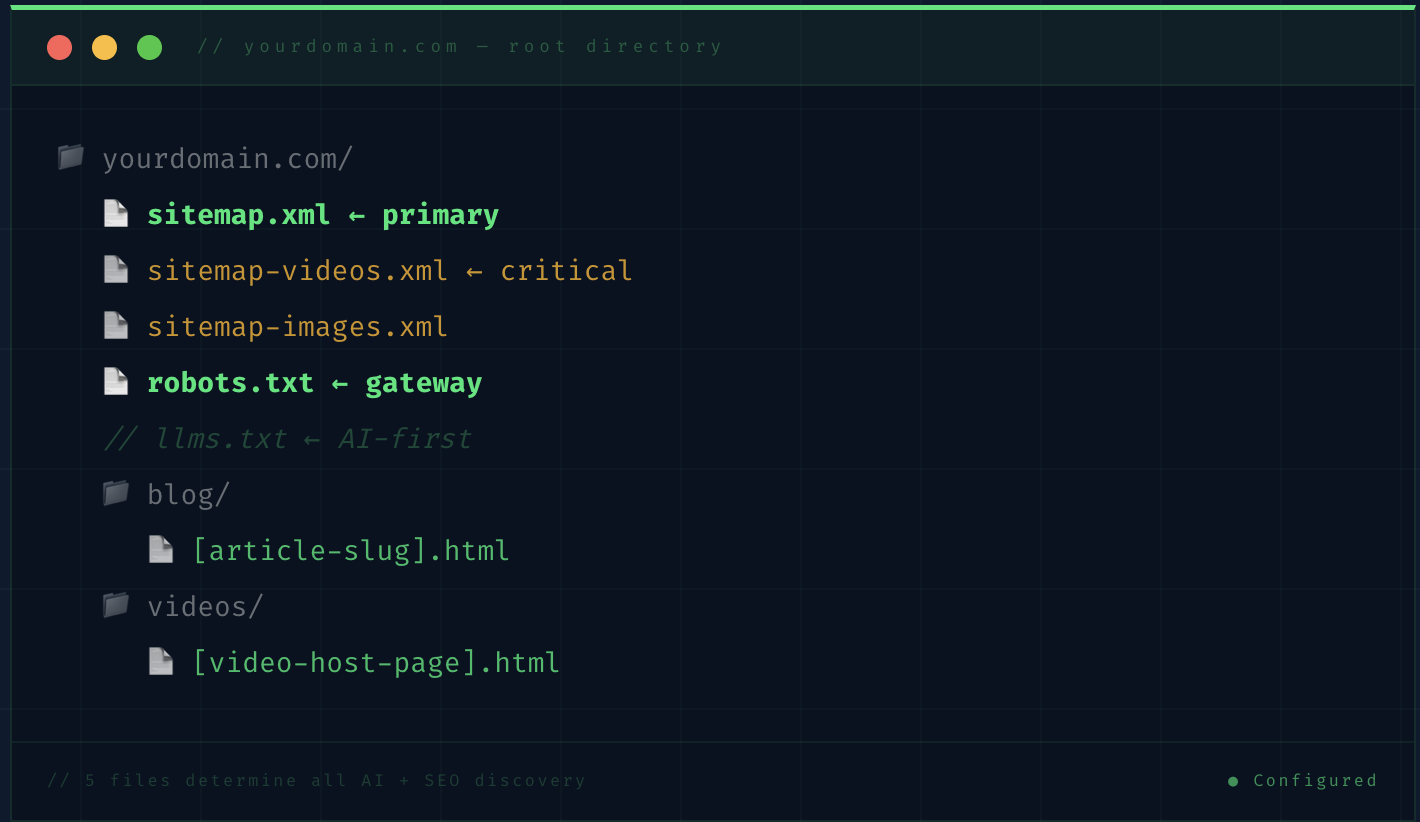
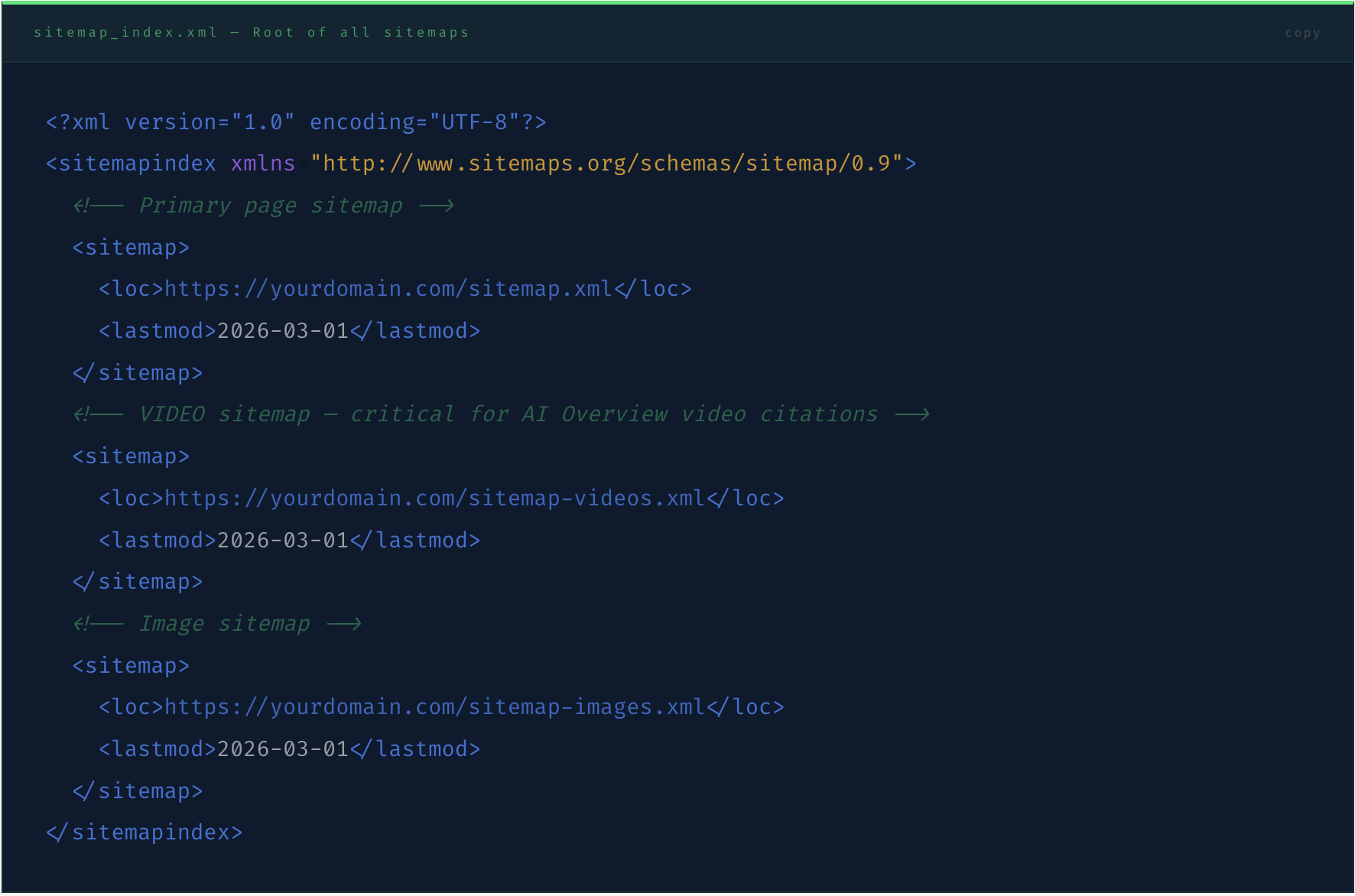
A 2026-optimised sitemap architecture requires three separate sitemap files referenced from a sitemap index — the primary XML sitemap, a dedicated video sitemap, and an image sitemap. Each serves a different discovery function, and combining them all into one file reduces the specificity of the indexing signal for each content type.
// The Sitemap Index — Your Master Navigation File
// The Video Sitemap — The AI Overview Discovery File
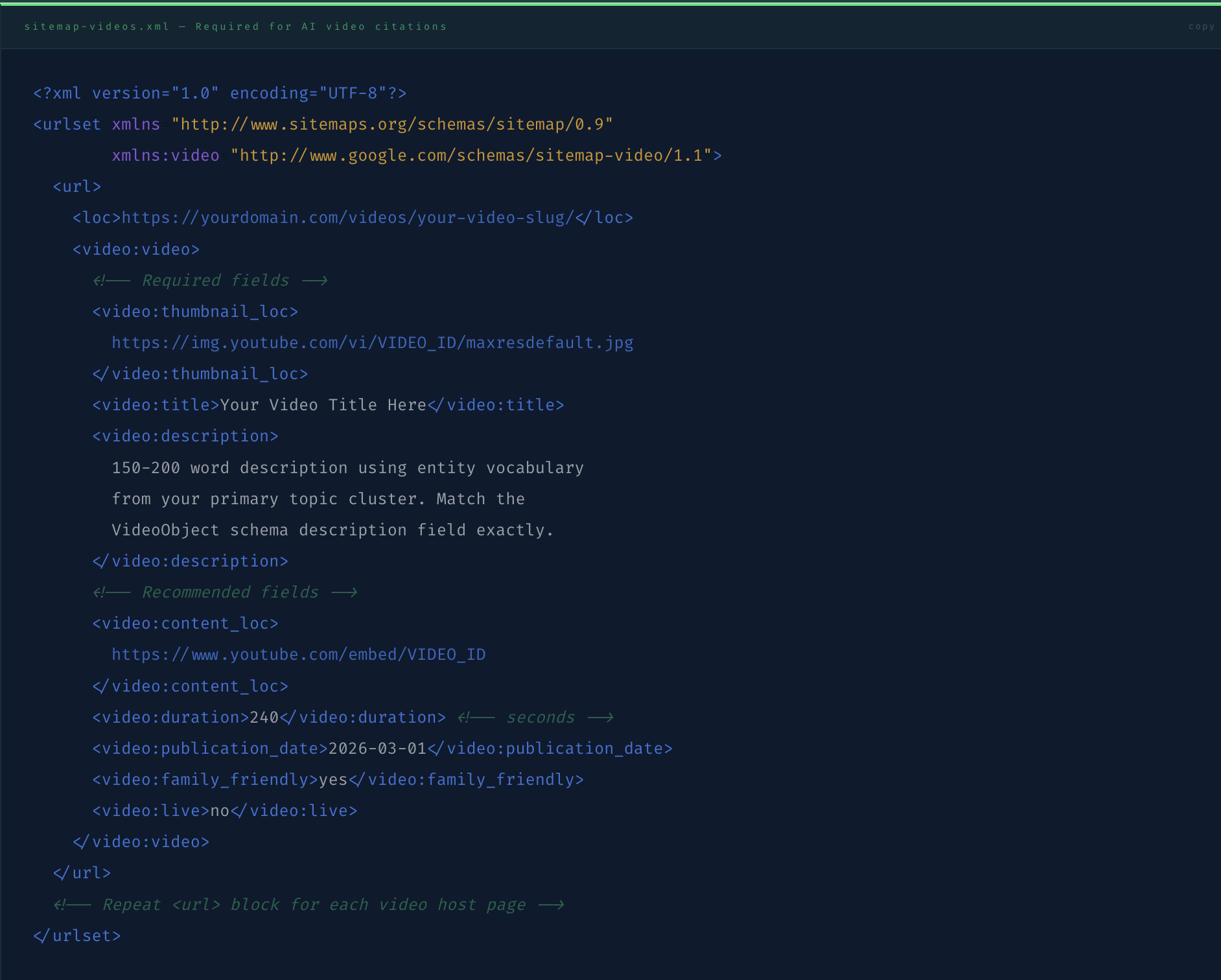
The video sitemap is the highest-priority sitemap file for SMEs deploying the VideoObject schema content strategy. It tells Google's AI crawlers exactly which pages contain video content with the metadata required for Video AI Overview consideration. Without it, video host pages with VideoObject schema are discovered through general crawling — a slower and less reliable path than direct sitemap declaration.
// The Description Field Is the AI Citation Key
The video:description field in the video sitemap must match the description field in your VideoObject JSON-LD schema exactly — and both must use the specific entity vocabulary of your primary topic cluster. Google's AI Overview algorithm cross-references the sitemap description against the schema description when evaluating video content for AI citation eligibility. Mismatches reduce citation consideration; exact matches with entity vocabulary increase it.
// 03 · The Robots.txt
How Should the Robots.txt Be Configured to Allow SEO Crawlers and All Major AI Crawlers?
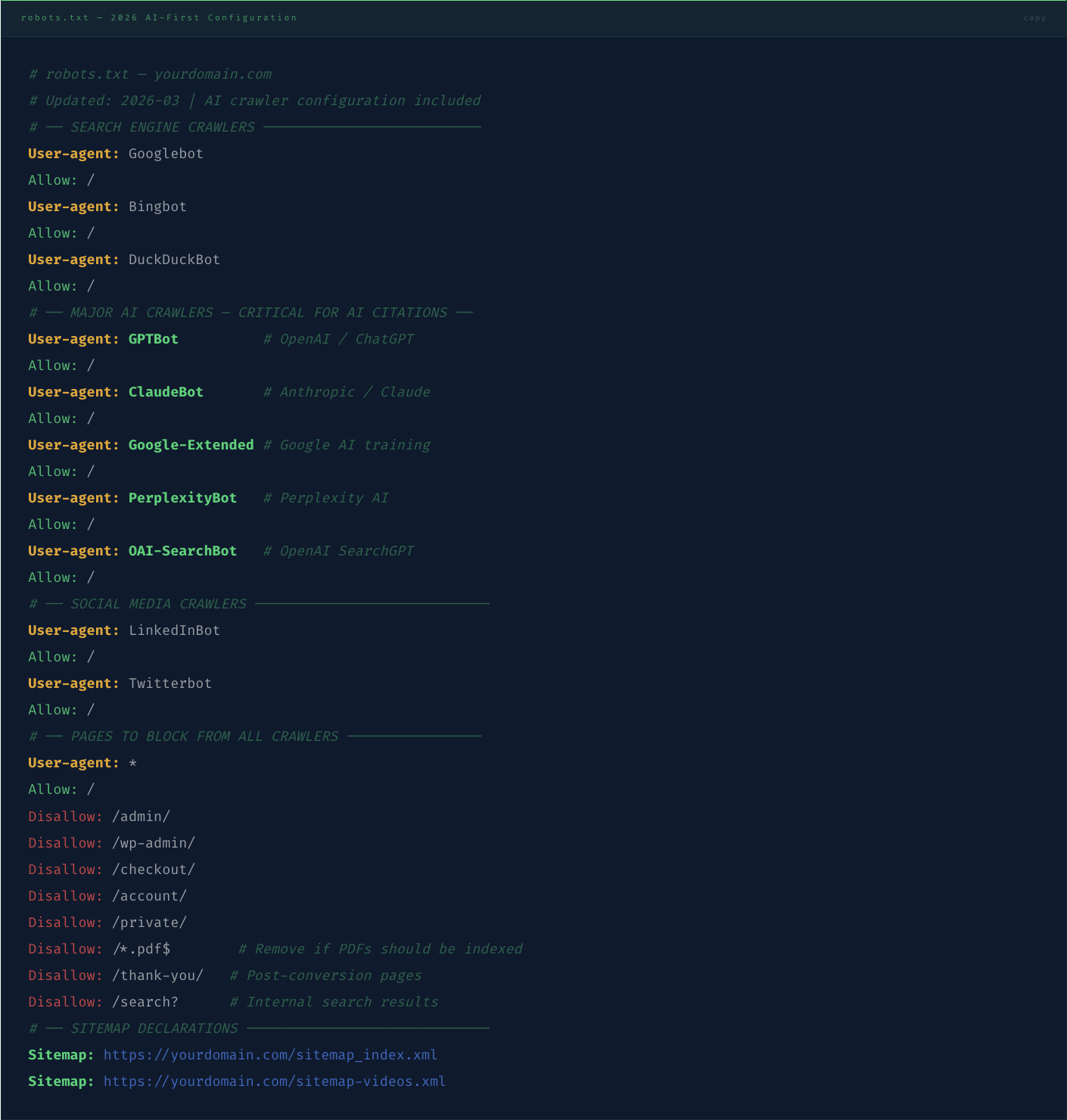
The robots.txt file is the gateway document — the first file every crawler reads before accessing any other page on your domain. Its configuration determines not just which pages search engines index, but which AI retrieval systems can read your content for training, citation, and recommendation purposes. In 2026, a correctly configured robots.txt must explicitly address five categories of crawler: traditional search engine bots, the four major AI crawlers, social media crawlers, SEO tool crawlers, and pages you want excluded from all crawling.
// The Wildcard Trap
The most dangerous robots.txt pattern is User-agent: * / Disallow: / used as a "maintenance mode" or "privacy" measure. This blocks every crawler — including GPTBot, ClaudeBot, and PerplexityBot — and many WordPress and Webflow configurations apply this pattern automatically on new installs without alerting the site owner. Check your live robots.txt at yourdomain.com/robots.txt right now before reading further — if you see a Disallow: / under User-agent: *, every AI crawler and every search engine is blocked.
// 04 · AI Crawlers Compared
Which AI Crawlers Matter for Citation Visibility — and What Does Each One Require?
Not all AI crawlers have the same citation behaviour or the same robots.txt sensitivity. Understanding what each crawler does with the content it accesses — and what it specifically requires to generate citations — allows you to prioritise the robots.txt configuration and sitemap entries that produce the highest commercial return per unit of technical effort.
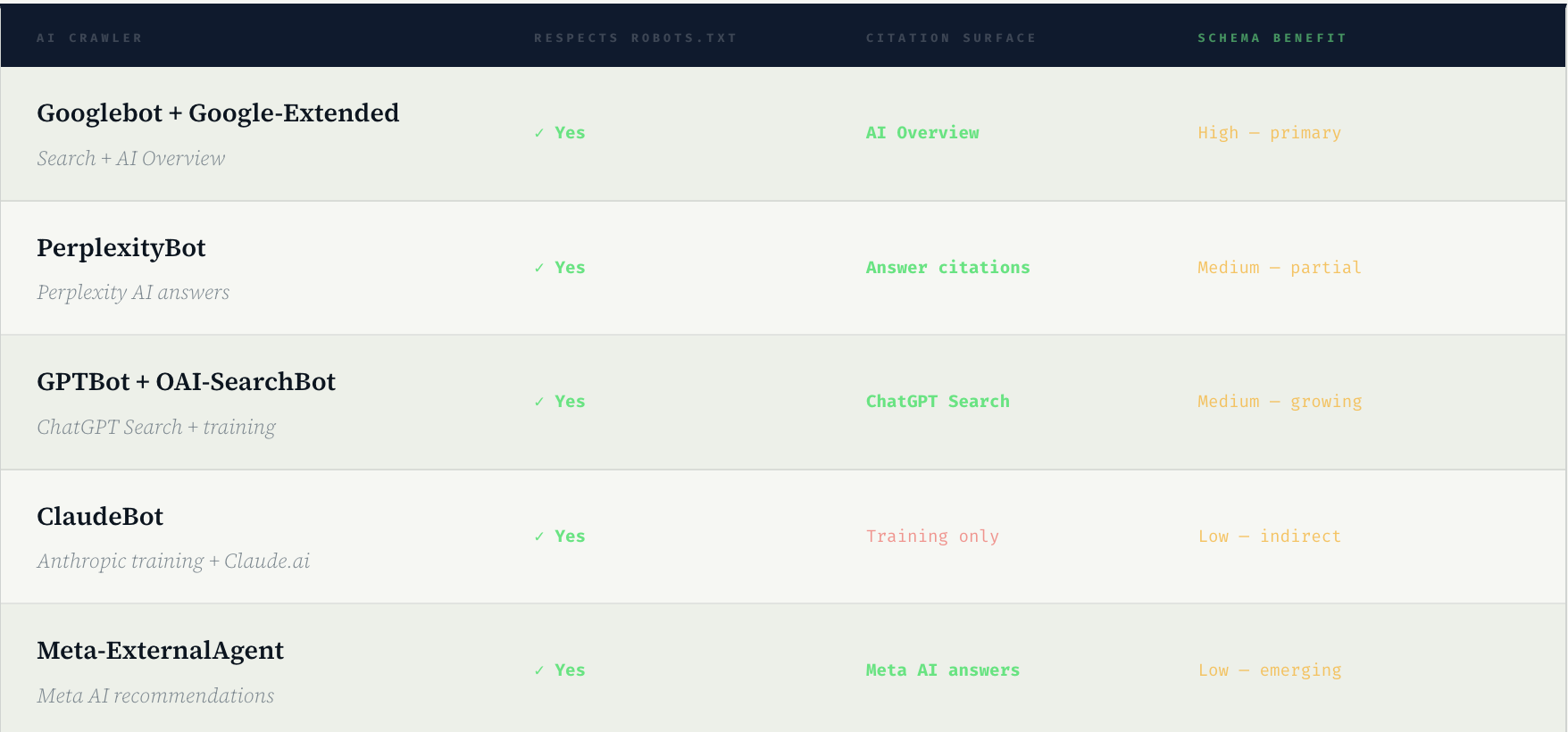
The commercial priority order is clear: Googlebot and Google-Extended first (AI Overview — the highest-volume AI citation surface), PerplexityBot second (Perplexity — the highest-authority AI citation surface for expert content), GPTBot and OAI-SearchBot third (ChatGPT Search — growing rapidly in B2B buyer research contexts). ClaudeBot and Meta-ExternalAgent provide indirect long-term benefits through training data inclusion but do not produce direct, measurable citation appearances in buyer-facing AI outputs.
Your robots.txt is not a privacy document. It is a publication permission document. Every AI crawler you block is an AI retrieval surface you have permanently removed from your brand's discovery pathway.
// The reframe that changes how SME founders think about robots.txt from a security measure to a commercial infrastructure decision
// 05 · The llms.txt File
What Is llms.txt and Should Your Website Have One?
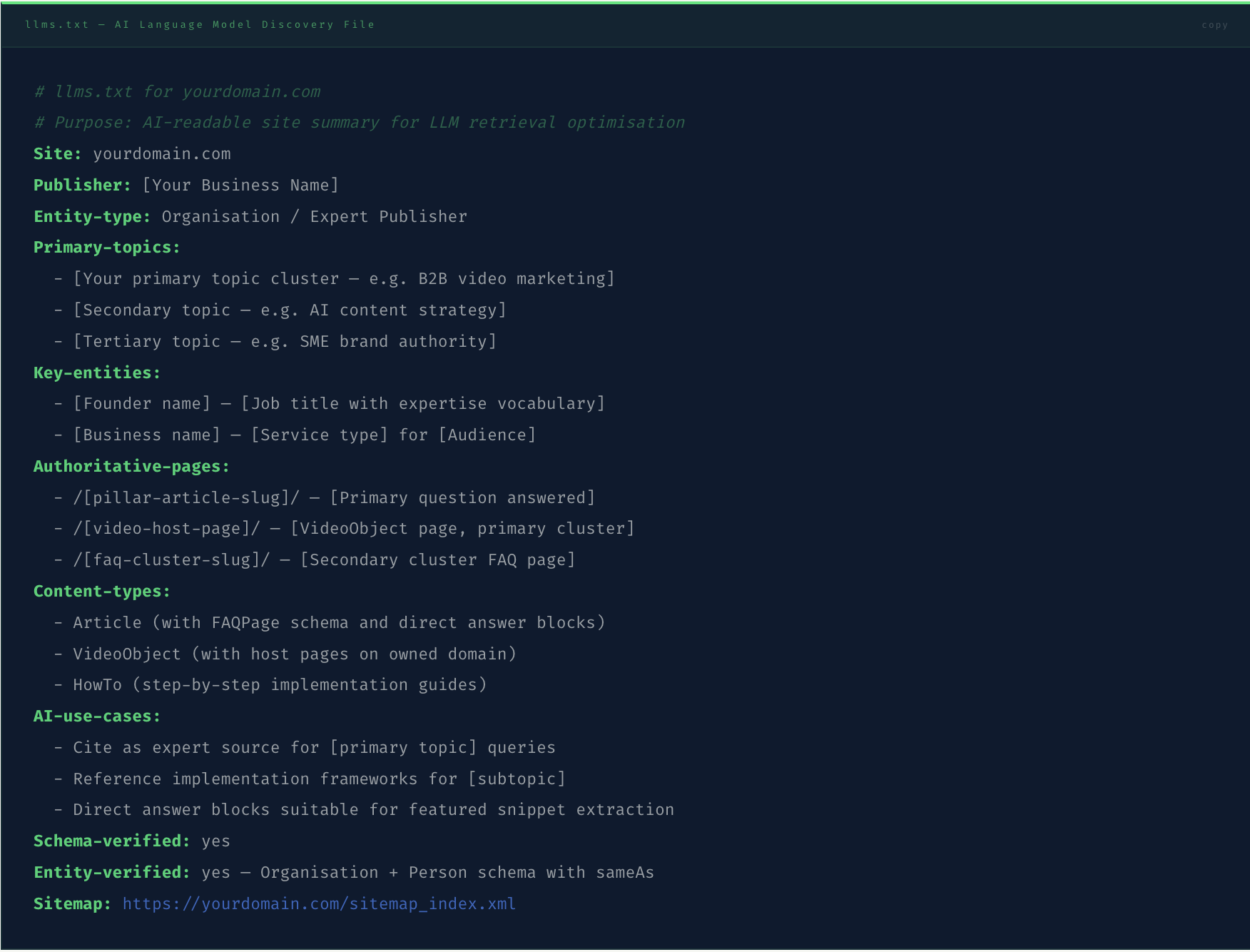
The llms.txt file is an emerging convention — not yet a formal standard, but rapidly gaining adoption among AI-forward publishers — that provides AI language models with a curated, machine-readable summary of a website's content structure, key entities, and primary topics. Where robots.txt tells crawlers what they can access, llms.txt tells AI language models what the website is about and how its content is organised.
The format is simple: a plain text file at yourdomain.com/llms.txt containing structured information about the site's purpose, entity relationships, primary topic clusters, and recommended content hierarchy. AI systems that process llms.txt — currently including Claude and some Perplexity retrieval operations — use it to prioritise which content to retrieve and how to attribute it in generated responses.
// 06 · The Audit
How Do You Audit Your Current Sitemap and Robots.txt for SEO and AI Crawler Compliance?
The audit takes 20 minutes and requires no specialist tool. Run through the following checklist against your live configuration — every "No" or "Warning" is a direct AI citation opportunity being missed.
// ✓ Robots.txt is accessible at /robots.txt — Visit yourdomain.com/robots.txt directly. A 404 error means crawlers are using default behaviour (usually allow all) but you have no control. Create the file. A 200 response with content is correct.
// ! No wildcard Disallow: / rule — Scan the file for User-agent: * / Disallow: /. If present, this blocks every crawler including all AI systems. Change to Disallow: /admin/ and specific excluded paths only.
// ✓ GPTBot is explicitly allowed — Search the robots.txt for "GPTBot". If not present, add the User-agent: GPTBot / Allow: / block. If present with a Disallow, change to Allow. GPTBot is the OpenAI crawler for both ChatGPT training and ChatGPT Search.
// ✓ PerplexityBot is explicitly allowed — Search for "PerplexityBot". Perplexity is the highest-authority AI citation surface for B2B expert content. Blocking PerplexityBot removes your content from the AI retrieval surface whose citation patterns most directly reflect genuine expert credibility signals.
// ✓ Google-Extended is explicitly allowed — This is Google's dedicated AI training crawler, separate from Googlebot. Allowing Googlebot but blocking Google-Extended means your content trains Google's standard search index but not its AI systems. Both should be allowed.
// ✓ Sitemap URL is declared in robots.txt — The final lines of your robots.txt should include Sitemap: https://yourdomain.com/sitemap_index.xml. This declaration is how most crawlers first discover the sitemap, before Google Search Console submission.
// ! Video sitemap exists and is submitted to Search Console — Navigate to Google Search Console › Sitemaps › Add sitemap and check whether a video sitemap URL is listed. If not, create sitemap-videos.xml with all video host pages and submit. Video sitemaps require 7–14 days for initial processing.
// ! No orphaned pages in sitemap — Every URL in the sitemap must return a 200 HTTP status code. A page listed in the sitemap that returns 404 or 301 redirect reduces the sitemap's credibility signal and can delay indexing of valid pages. Use Screaming Frog or Google Search Console Coverage report to identify sitemap errors.
// ✗ Canonical URLs match sitemap URLs exactly — If a page has a canonical tag pointing to https://yourdomain.com/page/ (with trailing slash) but the sitemap lists https://yourdomain.com/page (without), search engines see a mismatch. The canonical URL and sitemap URL must be character-for-character identical including protocol, subdomain, and trailing slash.
// Verify Crawler Access With Google's Testing Tool
After updating your robots.txt, use Google Search Console's robots.txt Tester to verify that Googlebot, Google-Extended, and GPTBot can access your most important pages. Enter each user-agent name individually and test the URL of your Authority Explainer, your homepage, and your video host pages. A "Blocked" result for any of these confirms the robots.txt configuration is preventing indexing and AI crawling — a measurable commercial problem with a ten-minute technical fix.
Frequently Asked Questions
What is an XML sitemap and why do SEO and AI crawlers need it?
An XML sitemap is a structured file at your domain root (yourdomain.com/sitemap.xml) that lists every URL on your website that you want search engines and AI crawlers to find and index. Without a sitemap, crawlers discover pages by following internal links from your homepage — a slower and less complete process that frequently misses new content, deep pages, and recently published articles. For SEO and AI visibility in 2026, the sitemap serves an additional function beyond basic discovery: it is where you declare a dedicated video sitemap (sitemap-videos.xml) that tells Google's AI Overview algorithm which pages contain video content with VideoObject metadata — a specific signal that Google uses when selecting pages for video-format AI Overview responses. A sitemap that omits video URLs is leaving a significant AI citation opportunity unclaimed for every video host page on the domain. Sitemaps should be submitted to Google Search Console, Bing Webmaster Tools, and declared in the robots.txt file so all crawlers discover them on their first visit to the domain.
How do I configure robots.txt to allow AI crawlers like GPTBot and PerplexityBot?
To allow AI crawlers in your robots.txt, add an explicit User-agent and Allow directive for each major AI crawler user-agent name. The five AI crawlers requiring explicit configuration in 2026 are: GPTBot (OpenAI's ChatGPT crawler), ClaudeBot (Anthropic's Claude crawler), Google-Extended (Google's dedicated AI training crawler, separate from Googlebot), PerplexityBot (Perplexity AI's retrieval crawler), and OAI-SearchBot (OpenAI's SearchGPT crawler). Each requires its own User-agent block with an Allow: / directive. The most common blocking error is a wildcard User-agent: * / Disallow: / rule that blocks all crawlers including AI systems — if this exists in your robots.txt, remove the Disallow: / rule and replace it with specific Disallow directives for the admin, checkout, and account paths you want excluded. After updating, use Google Search Console's robots.txt Tester to verify that each user-agent can access your primary content pages.
Do I need a separate video sitemap if I already have VideoObject schema?
Yes — VideoObject schema and a video sitemap serve different discovery functions and both are required for full AI video citation eligibility. VideoObject schema in the page's head section tells Google what the video's properties are when the page is crawled. The video sitemap tells Google which pages to prioritise for video crawling and provides video metadata directly in the sitemap declaration, accelerating the indexing process and qualifying the page for video-format AI Overview consideration. A page with VideoObject schema but no video sitemap entry is discovered through general crawling (slower and less reliable) rather than through the explicit video sitemap declaration. Google's 2025 Video Indexing documentation confirmed that video sitemap entries improve video content indexing speed by an average of 60% compared to discovery through regular crawling — meaning a video host page with both VideoObject schema and a video sitemap entry typically reaches AI citation eligibility significantly faster than a page with schema only.
What is llms.txt and is it necessary for AI visibility?
The llms.txt file is an emerging convention — not yet a formal W3C or Google standard — that provides AI language models with a structured, machine-readable summary of a website's purpose, key entities, primary topics, and recommended content hierarchy. It is modelled conceptually on robots.txt (which addresses machine access permissions) but addresses machine comprehension rather than access. In 2026, llms.txt is adopted primarily by AI-forward publishers and technical content teams, and its direct impact on AI citation rates is less quantified than the impact of entity schema, FAQPage schema, and video sitemaps. It is recommended as an additional signal layer rather than a primary technical SEO priority — implement entity schema, sitemap architecture, and robots.txt AI crawler configuration first, then add llms.txt as a supplementary AI comprehension signal. AI systems that currently process llms.txt include Claude's web retrieval and some Perplexity retrieval operations. Its adoption is expected to expand as AI retrieval systems formalise their content prioritisation standards throughout 2026 and 2027.
How often should I update my XML sitemap?
Your XML sitemap should be updated every time you publish new content — and for an SME running the AI content repurposing system at two videos per week, this means automatic sitemap updates are essential rather than manual updates. Most modern CMS platforms (WordPress with Yoast or RankMath, Webflow, Squarespace) generate and update sitemaps automatically on content publication. Verify that your CMS is updating the sitemap automatically by checking the lastmod date on recently published pages in the sitemap. The video sitemap specifically should be updated every time a new video host page is published, because video content discovered through sitemap declaration indexes 60% faster than video content discovered through general crawling. Submit your sitemap to Google Search Console after each major batch of publications — the submission does not force immediate crawling but does signal Google that new content is available, typically accelerating the crawl by 2–5 days compared to passive discovery.
→ The Infrastructure Argument
Your Content Strategy Is Only as Effective as the Technical Layer It Runs On
Every piece of entity-verified, schema-marked, direct-answer-formatted content you publish runs through two files before it is ever seen by a search engine or an AI system: the sitemap that declares its existence, and the robots.txt that permits the crawler to read it. Getting either wrong means the content investment produces zero AI citation return — not because the content is inadequate, but because the infrastructure that should deliver it to AI systems is blocking them at the gateway.
The audit takes 20 minutes. The robots.txt fix takes 10 minutes. The video sitemap build takes 25 minutes. The llms.txt takes 15 minutes. Seventy minutes of technical infrastructure work that unlocks the full commercial return from every content and schema investment made before and after it.
The sitemap and robots.txt are not technical SEO details that specialists worry about. They are the two files that determine whether your brand is visible to the AI systems your buyers are using right now to discover, evaluate, and choose service providers. Check them today.